
Visitors’ data requests
Under data protection law, such as the GDPR, a visitor can ask what you keep about them, ask for a copy, or ask you to erase it. Your organization is responsible for the chats on your website, so the request comes to you, and the Data requests page is where you answer it. Admins and the Owner see the page.
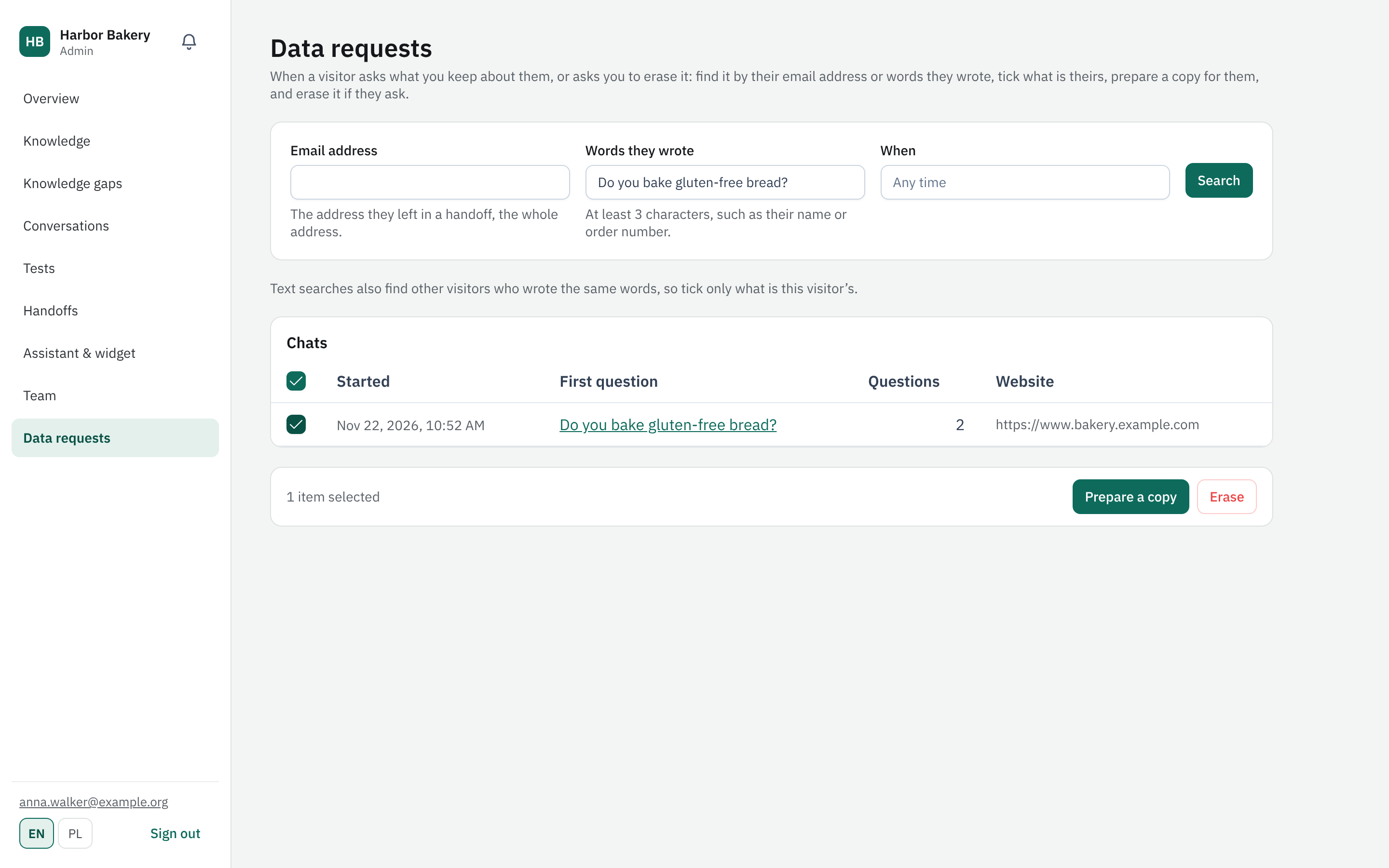
Find what is theirs
Fill in what you know and select Search:
- Email address: the address the visitor left when they asked to be contacted by a person. Type the whole address. It finds their handoffs, and the chats those handoffs came from.
- Words they wrote: at least 3 characters, such as their name, an order number or a sentence they remember writing. It finds the chats in which the visitor wrote them, handoffs whose question holds them, and copies of their questions in your tests.
- When: the days the visitor chatted, if you know them. It narrows the chats and handoffs; questions copied into your tests are found whatever their date.
Asquo hides email addresses and phone numbers that visitors type in a chat, so an email address finds a chat only through a handoff. To find chats, search for words the visitor wrote.
The results are grouped into Chats, Handoffs, Test questions and Earlier test results (copies of questions kept by test runs after the question was edited or removed). Each group shows up to 50 items; if more were found, the page says so: narrow the search before you go on.
A search for words also finds other visitors who wrote the same words. Open the items you are not sure about and tick only what is this visitor’s.
Give them a copy
- Tick what is theirs and select Prepare a copy.
- If a handoff has a note your team wrote, read it under Staff notes. A note can hold the visitor’s personal data, so it belongs in the copy, but remove anything about other people or confidential material, and mark where you removed something, for example “[removed]”. Tick Note checked for each one.
- What the visitor gets shows the copy as they will read it. Select Download text file and send it to the visitor.
Download JSON (for transfer) gives the same data in a machine-readable format. Send it only when the visitor asks for their data to move it to another service (data portability).
The copy shows times in your computer’s time zone and says which one.
Erase it
When the visitor asks you to erase their data, tick what is theirs, select Erase and confirm. This cannot be undone, so prepare the copy first if they asked for one too.
- Chats are deleted with every message.
- Handoffs keep only their status, category and dates: the visitor’s name, email address, phone number, call-back time, question and your team’s note are erased. They show as Erased.
- Test questions are deleted, with their results in earlier test runs.
Chats and handoffs older than the period in Data retention are erased every night anyway; a request lets you erase them sooner. Copies of a visitor’s questions in your tests stay until you erase them. Emails Asquo already sent to your team about a handoff stay in your team’s mailboxes: erase them there yourself. Copies in Asquo’s backups expire within 35 days, and if Asquo ever restores a backup, it erases them again before anyone sees the data. Every search, copy and erasure is recorded in the organization’s audit log, without the visitor’s data itself.