
Knowledge gaps
Knowledge gaps show what visitors ask that your knowledge does not answer yet. On a paid plan Asquo collects these questions every night and groups them by subject, so you can see what to add first. Open them from Knowledge gaps in the menu.
What gets in
A question joins a gap when the assistant found no answer to it in your knowledge, or when the visitor rated the answer Not helpful in the chat. Every night, at 2:00 UTC (in Poland 3:00 in winter, 4:00 in summer), the questions of the past days are grouped by subject: a new question joins the gap with the closest subject, or starts a new one. The AI names each gap from its questions.
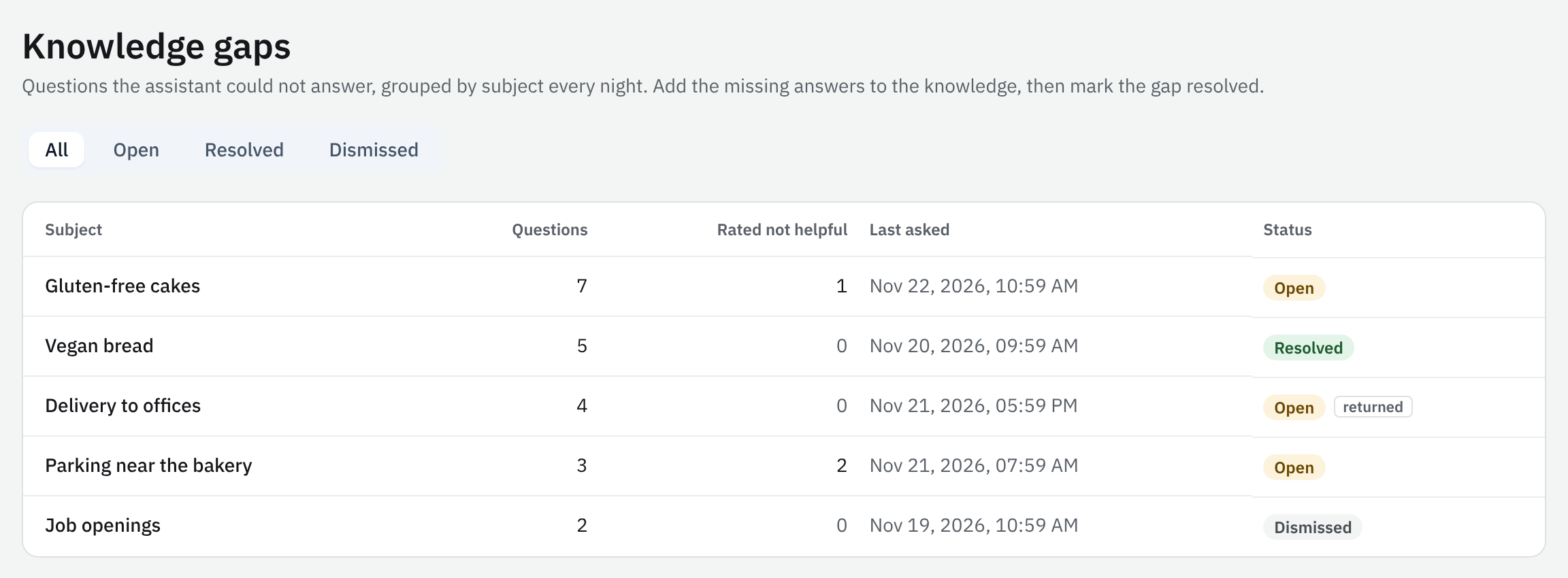
The gaps with the most questions come first. The list shows each gap’s Subject, how many Questions it has, how many of them were Rated not helpful, when it was Last asked and its Status. Filter by status with the buttons above the list.
Look at a gap
Select a gap to see its questions, newest first, with Not helpful next to the ones visitors rated. Open chat shows the whole conversation, to see what the visitor meant. The latest questions are listed; older ones, and questions whose chat was deleted after the retention period, still count but are not listed.
If a question is in the wrong gap, select Move next to it and choose another gap, or New knowledge gap to start one of its own. Title renames the gap; leave it empty to get a title written from the questions overnight.
Close a gap
- Add answer opens a new Q&A with the gap’s latest question filled in. Write the answer and add it: the gap is then marked resolved.
- Mark as resolved when you added the answer another way, for example on your website or in a file.
- Dismiss subjects the assistant should not answer, such as jokes. New questions on the subject still join the gap, but it stays dismissed.
- Open again brings a resolved or dismissed gap back.
When visitors ask about a resolved subject again without getting an answer, the gap opens again by itself and is marked returned: the answer you added is probably not being found. Check how it is worded, for example by asking the question in Test the assistant.
Everyone in the organization can see knowledge gaps. Owners, Admins and Editors can change them.
Plans
Knowledge gaps are on paid plans. On the free plan unanswered questions are not grouped.