
Contradictions
When two sources state different facts about the same thing, such as an old price list and a new one, the assistant may give visitors either. On a paid plan Asquo looks for such pairs every night and lists them on the Knowledge page, under Contradictions.
How they are found
Every night Asquo compares the text of sources added or changed since the night before with the closest passages of your other sources, and asks the AI which of them state different facts. Changes made in the last hour before the check wait for the next night. A large knowledge base, for example one added all at once, can take a few nights to check in full.
Only sources the assistant answers from today are listed. A contradiction with a source that is not live, or outside its dates, is not shown, and shows again when the source is back.
What you see
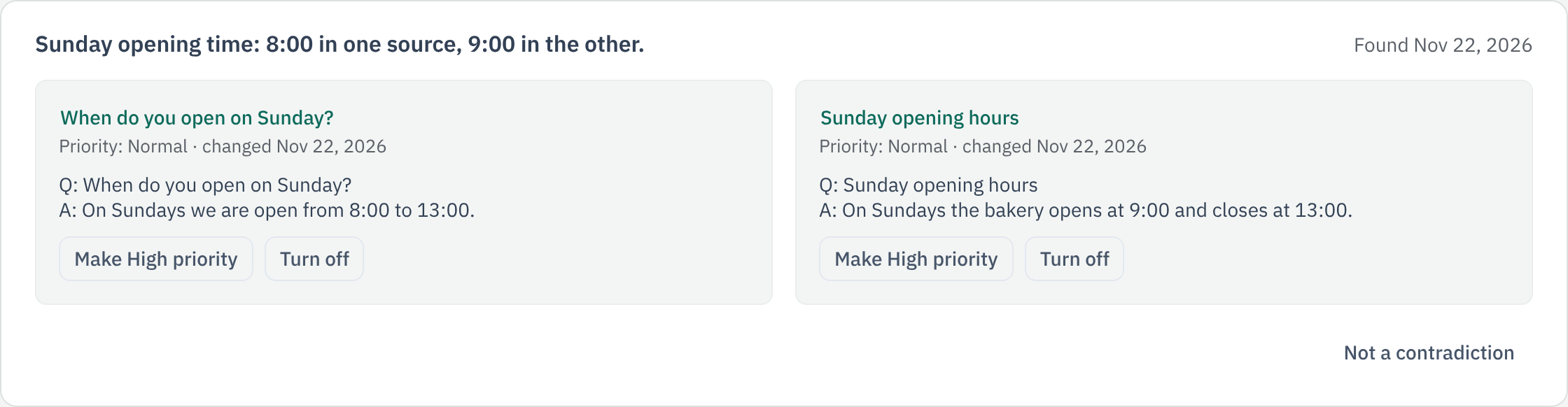
Each contradiction shows:
- a short description of what differs, and when it was found;
- the two passages side by side, each with its source’s name, the page or section where the source has one, its priority and when it was last changed;
- Also in 1 other contradiction (or more) when the same source disagrees with others too: then fixing that one source settles several pairs.
Settle it
Decide which source is right, then:
- Fix the wrong source: select its name to open it (a Q&A’s answer can be corrected right there), or correct the page or the document itself and read or upload it again. A changed passage leaves the list once it is indexed again, and the next night checks the new text.
- Turn off the outdated source. The assistant stops using it at once, and it leaves every contradiction it is in. You can turn it on again under Sources.
- Make High priority on the right one: when sources disagree, the higher priority wins. The button is not offered when one of the two already has High. Use it when both sources must stay, for example a Q&A that corrects an older page; see Settings of every source.
- Not a contradiction, when the two passages do not really disagree. The pair leaves the list, and the nightly check does not show it again unless the text of one of the passages changes.
Everyone in the organization can see contradictions. Owners, Admins and Editors can act on them.
Plans
Contradictions are on paid plans. On the free plan the section shows a lock, and sources are not compared.